When a cell holds a comma, a double quote, or a line break, a CSV file needs some way to keep that cell in one piece. We saved a small test sheet as a CSV in Excel, read the bytes of the files, and reopened them to see what Excel wrote and what came back.
This guide shows the sheet we used, the exact text Excel saved for each kind of cell, and what we saw when we opened those files again.
Tested in: Excel 2021 desktop (Version 2608) with an English interface, on Windows with Korean regional settings (list separator ,, decimal point .). Everything below describes what happened on that one setup. We did not test other Excel versions, other regional settings, or Mac, and results may differ there.
Our Test Sheet
We created a workbook with a script rather than typing it in Excel, with five data rows. Each row has a different kind of cell content:
| id | name | note | What it tests |
|---|---|---|---|
| 1 | Alpha Co | plain text | No special characters |
| 2 | Beta, Inc | one, two | Commas |
| 3 | Gamma 12″ pipe | He said “ok” | Double quotes |
| 4 | Delta | line one (line break) line two | A line break inside a cell |
| 5 | Epsilon | a, “b” (line break) c | A comma, quotes and a line break together |
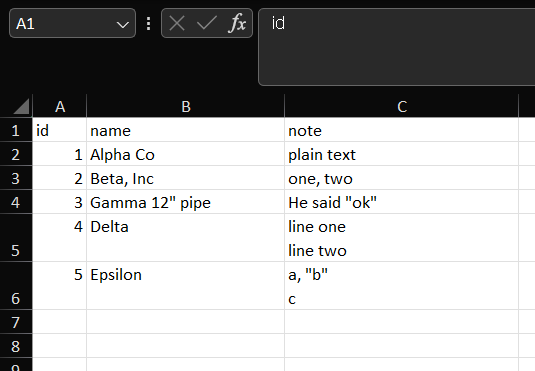
The line breaks are real breaks inside the cell, so the cell shows two lines. We kept this workbook as it was and saved new files from it.
Saving the Sheet as CSV
We used File > Save As and saved the sheet twice under new file names, once as “CSV UTF-8 (Comma delimited)” and once as “CSV (Comma delimited)”. Excel did not show a warning dialog for either save. If you are choosing between the two formats, our byte-level comparison of both save options covers the BOM and special-character differences. Here we only look at how the cells were written.
What Excel Wrote
We looked at the bytes of both files outside Excel. This is the text of the UTF-8 file, without its invisible BOM at the start:
id,name,note
1,Alpha Co,plain text
2,"Beta, Inc","one, two"
3,"Gamma 12"" pipe","He said ""ok"""
4,Delta,"line one
line two"
5,Epsilon,"a, ""b""
c"- A cell with plain text and no special characters was written as it is, without quotes:
Alpha Coandplain text. The header row and the numbers were also written without quotes. - A cell with a comma was wrapped in double quotes:
"Beta, Inc"and"one, two". - A cell with a double quote was wrapped in double quotes, and each double quote inside the cell was written twice:
He said "ok"became"He said ""ok""", andGamma 12" pipebecame"Gamma 12"" pipe". - A cell with a line break was wrapped in double quotes, and the break stayed inside them, so the text of one row takes two lines in the file.
- Each row ended with a carriage return and a line feed (bytes
0D 0A), including the last row. The line break inside a cell was a single line feed (0A). - The file saved as “CSV (Comma delimited)” had the same bytes as the UTF-8 file, except that it did not have the three-byte BOM at the start. The UTF-8 file was 157 bytes and the other was 154 bytes. Our test text uses only plain ASCII characters, so this says nothing about accented letters.
What We Saw When Opening the CSV Again
We opened the file saved as “CSV (Comma delimited)” with File > Open (Ctrl+O). It opened without the Text Import Wizard, with the header and all five data rows, one cell per field. We did not reopen the UTF-8 file this way.
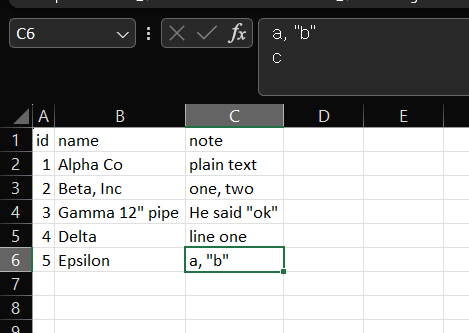
The Beta, Inc and one, two cells stayed in one cell each, and the quotes were not shown around the cells. Cell C6 holds the text a, "b" followed by a line break and c; the formula bar shows both lines. The row for Delta shows only its first line, line one, in the grid, which we did not investigate further. We closed the workbook without saving.
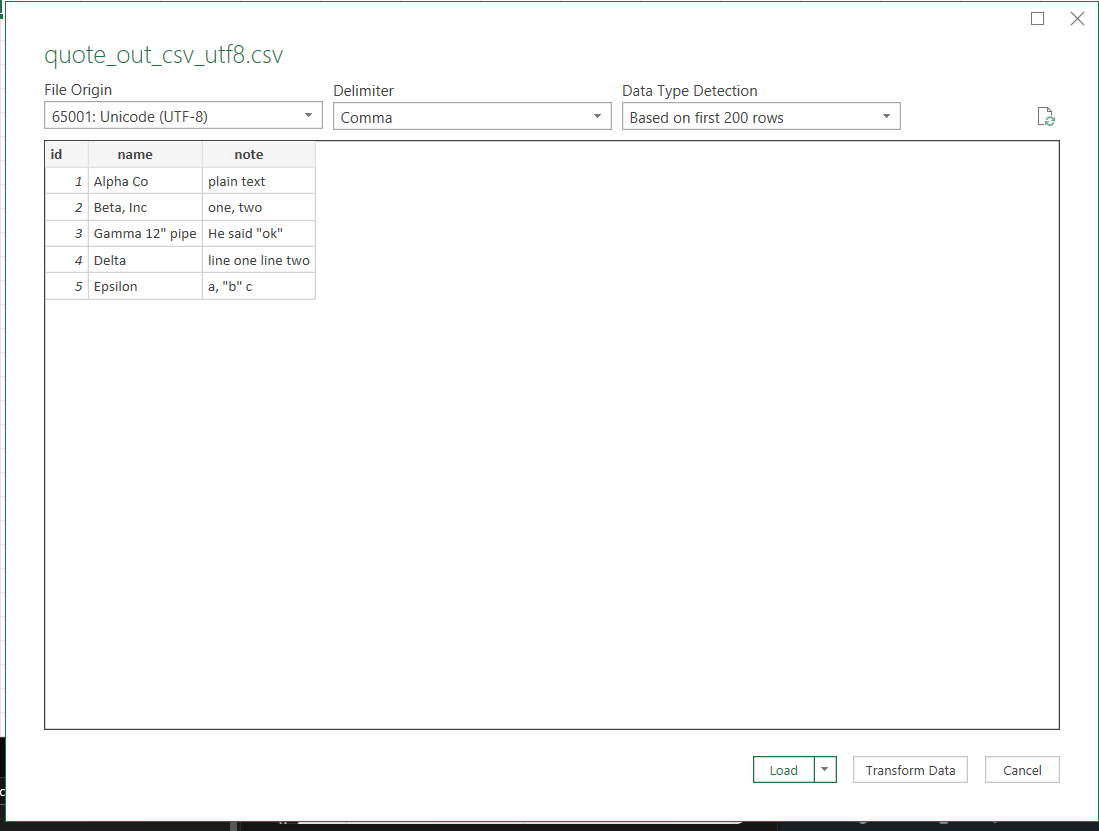
We also used Data > Get Data > From File > From Text/CSV, this time on the UTF-8 file.
Tap the image to view it at full size.
The preview showed File Origin 65001: Unicode (UTF-8), Delimiter Comma, and five data rows. In the preview, the line breaks in the note column look like spaces (line one line two). We clicked Load, and the Queries & Connections pane said “5 rows loaded”. To check the cells, we typed a formula into a spare cell. LEN of the Delta note was 17, and the ninth character had the code 10, which is a line feed. LEN of the Epsilon note was 8, and its seventh character was also code 10. Gamma 12" pipe and He said "ok" came back with their quotes, one each. So the loaded cells held the line breaks and quotes, even though the preview and the grid did not show the breaks as separate lines.
How We Would Use This
- If your cells contain commas, quotes or line breaks, we would let Excel write the CSV rather than edit the file by hand. In our test it quoted every cell that needed it and doubled the quotes inside.
- Check how the program that reads your CSV treats quoted fields. We only tested Excel, and we did not test any other program.
- If line breaks inside cells are not wanted in the data, they can be removed before saving; see how to remove line breaks from cells in Excel. We did not test how that affects the saved CSV.
- Keep the original workbook, and save the CSV under a new file name. A CSV file keeps the text and values, not the sheet formatting.
For the reverse problem, a CSV that opens in one column, see what happened with a semicolon CSV.
Things to Know
- Scope. Everything above comes from one five-row sheet, saved twice on Excel 2021 (Version 2608) with Korean regional settings and a comma list separator. We did not test other Excel versions, other regional settings, or Mac.
- Not tested. Opening the files in programs other than Excel, double-clicking a CSV in File Explorer, a different list separator, a semicolon-delimited save, cells with leading or trailing spaces, tab characters, a cell with only a double quote, carriage returns inside cells, very long cells, CSV (Macintosh) and CSV (MS-DOS), Unicode Text, files with more than five rows, and Excel for the web.
- Unconfirmed. We do not know why the grid showed only the first line of the Delta cell after we reopened the file. We also did not check how Excel decides which cells get quotes beyond the cases above.
- Keep the original. Save under a new file name and keep a copy of the source workbook.
One-line Summary
In our Excel 2021 test, saving as CSV wrapped cells with commas, double quotes or line breaks in double quotes, doubled the quotes inside them, kept in-cell line breaks as a single line feed, and the files we reopened came back with one cell per field, the “CSV (Comma delimited)” file through File > Open and the UTF-8 file through From Text/CSV.
Sources
Screenshots and behavior described as “we saw” come from our own test in Excel 2021 on one setup. Microsoft documentation used for the points noted above:
- Excel formatting and features that are not transferred to other file formats: for CSV (Comma delimited), it says the format saves the text and values as displayed and encloses a cell that contains a comma in double quotation marks. As we read it, the page does not describe double quotes or line breaks inside cells, so those results come from our test.