Removing exact duplicates is easy. Jon Smith and John Smith are not exact duplicates, so a normal duplicate check keeps both. Power Query has a fuzzy merge that can pair up names that are similar but not identical.
This guide merges a customer list with itself using fuzzy matching and filters out each row’s match with itself. What is left is a list of candidate pairs. We ran it on 18 made-up names and report what it paired, what it missed, and what changed when we lowered the similarity threshold. The result is a candidate list for a person to review, not a final answer.
Tested in: Excel 2021 desktop (Home & Business 2021, Version 2608) with an English interface on Korean-language Windows. We did not test other Excel versions.
The List
Our Customers sheet has one column, customer_name, with 18 names. They include a pair that differs by one letter (Jon Smith, John Smith), a spelling variant (Katherine Lee, Catherine Lee), an exact duplicate (Priya Patel twice), a nickname (Mike Johnson, Michael Johnson), a company name written two ways (Acme Corp, ACME Corporation), a double space (Maria Garcia, Maria Garcia), and two names that may be different people (Dan Brown, Dana Brown). All names are fictional.

Step 1: Add an Index Column
Load the list into Power Query (select a cell in the list, then Data > From Table/Range). Then add an index column that starts at 1 (Add Column > Index Column > From 1). Our query got a second column called Index with the numbers 1 to 18.
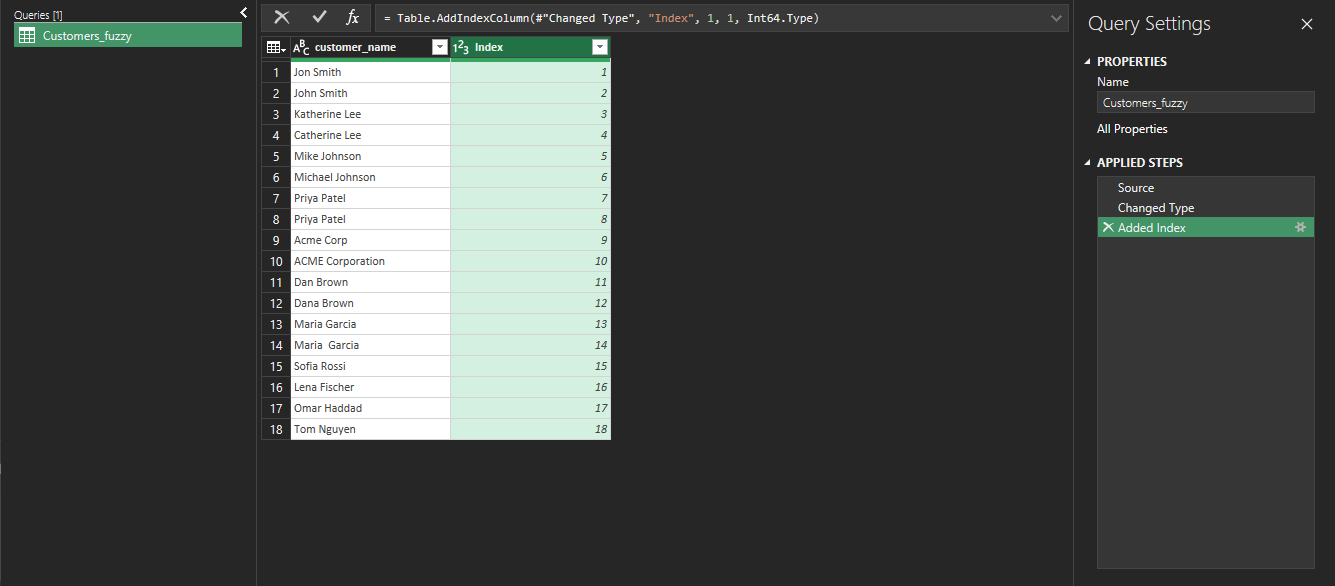
The index matters later. When a list is merged with itself, every name matches itself. The index lets us remove those self-matches.
Step 2: Merge the Query With Itself
Choose Home > Merge Queries. In the dialog, the second table can be the same query: ours was listed as Customers_fuzzy (Current). Select customer_name in both tables, set Join Kind to Inner, and check Use fuzzy matching to perform the merge.

The fuzzy options in our dialog were: Similarity threshold (optional), Ignore case, Match by combining text parts, Maximum number of matches (optional), and Transformation table (optional). We left the similarity threshold blank for the first run. The screen does not show what default value Power Query uses in that case, so we do not state one.
Step 3: Expand and Remove Self-Matches
Expand the new column and keep both customer_name and Index. Power Query names them Added Index.customer_name and Added Index.Index. Then add a custom column named same_row with this formula:
[Index] = [Added Index.Index]Filter same_row to keep only FALSE. A TRUE row is a name matched with itself.
The Result With the Default Threshold
With the threshold blank, the result had 10 rows. Each pair appears twice, once in each direction, so that is 5 pairs:

| Pair | Kind of difference |
|---|---|
Jon Smith and John Smith | One letter |
Katherine Lee and Catherine Lee | Spelling variant |
Priya Patel and Priya Patel | Exact duplicate |
Dan Brown and Dana Brown | Possibly two different people |
Maria Garcia and Maria Garcia | Double space |
Two pairs we expected were not in the list: Mike Johnson with Michael Johnson, and Acme Corp with ACME Corporation.
What Happened When We Changed the Threshold
We ran the same steps with three thresholds typed into the Similarity threshold box:
| Threshold | Rows | Pairs | Difference |
|---|---|---|---|
| blank (default) | 10 | 5 | Mike/Michael and Acme/ACME missing |
| 0.6 | 10 | 5 | Same 5 pairs |
| 0.9 | 10 | 5 | Same 5 pairs |
| 0.3 | 14 | 7 | Adds Mike/Michael and Acme/ACME |
Going from the default to 0.6 or 0.9 changed nothing on this list. At 0.3 the two missing pairs appeared, and no unrelated names such as Sofia Rossi or Omar Haddad were paired with them.

Dan Brown and Dana Brown were paired at every threshold we tried. A threshold does not tell you whether two similar names are the same person. That takes a person who can look at an address, an email, or an order history.
Load the Candidate Pairs
Choose Close & Load to put the pairs on a new sheet. With the 0.3 threshold, our sheet had 14 rows of pairs, and the original Customers sheet was unchanged.

Things to Know
- One small test. This is one run on 18 names. We do not know how the same settings behave on other data, and we did not test a large list.
- We cannot explain the misses. We saw that
Mike JohnsonandAcme Corpwere not paired at the default, 0.6, or 0.9. We did not find out why. - Not tested. We did not use Maximum number of matches or a Transformation table.
- Whitespace. The double-space pair was matched. For ordinary spaces and the non-breaking space, see why TRIM isn’t removing non-breaking spaces. We did not test that character here.
- Exact duplicates. If you only need exact duplicates, Power Query’s Remove Duplicates is the simpler tool. To find items that are in one list and not in another, see comparing two lists.
One-line Summary
A fuzzy merge of a list with itself, minus the self-matches, gives a candidate list of near-duplicate names for a person to review. On our 18 names it found 5 pairs by default and 7 pairs at a threshold of 0.3, and it paired Dan Brown with Dana Brown at every threshold.
Sources
- Note: every result in this guide, including the pairs, the thresholds, and the formulas shown in the editor, comes from our own reproduction in the Excel 2021 desktop app. We did not check the fuzzy merge options against Microsoft’s documentation, so we make no claim about how the similarity score is calculated.